Introduction: Why Proper Setup Matters
Most crypto traders eventually reach the same point. You are trading actively, jumping between Binance, Bybit, OKX or KuCoin. You take a mix of scalp trades and short intraday moves. Some trades feel great. Others feel emotional or forced. At the end of the week, you try to figure out why your results are inconsistent, but the answers are not obvious.
That is usually the moment traders start looking for a proper trading journal. Something better than spreadsheets or random screenshots. Something that helps you understand what is actually working. That is where TradeChainly fits in. It is built specifically for crypto day traders and scalpers who want real performance data without spending hours managing it.
But here is the important part. A trading journal only works if it is set up properly. If trades are not imported consistently, if tagging is messy, or if your workflow is unclear, you will not get the clarity you are looking for. Proper setup is what turns TradeChainly from “another tool” into something that actually guides your trading decisions.
In this guide, I will walk you through how to set up TradeChainly step-by-step. You will connect your exchanges, organize your trades, create meaningful tags, and build a simple review routine that fits real crypto trading. Nothing complicated. No technical jargon. Just a clean workflow that supports fast-paced trading environments.
By the end, you will have a trading journal that runs almost automatically. Your trades sync while you trade. Your data builds over time. And you finally have an objective way to understand your edge as a day trader.
Creating Your TradeChainly Account and Initial Setup
Getting started with TradeChainly is straightforward, even if you have never used a trading journal before. Once you create your account and log in for the first time, you will land in a clean workspace designed around how crypto day traders actually trade. Nothing feels overloaded or complicated. The goal is simple: help you get your trades flowing into the platform as easily as possible.
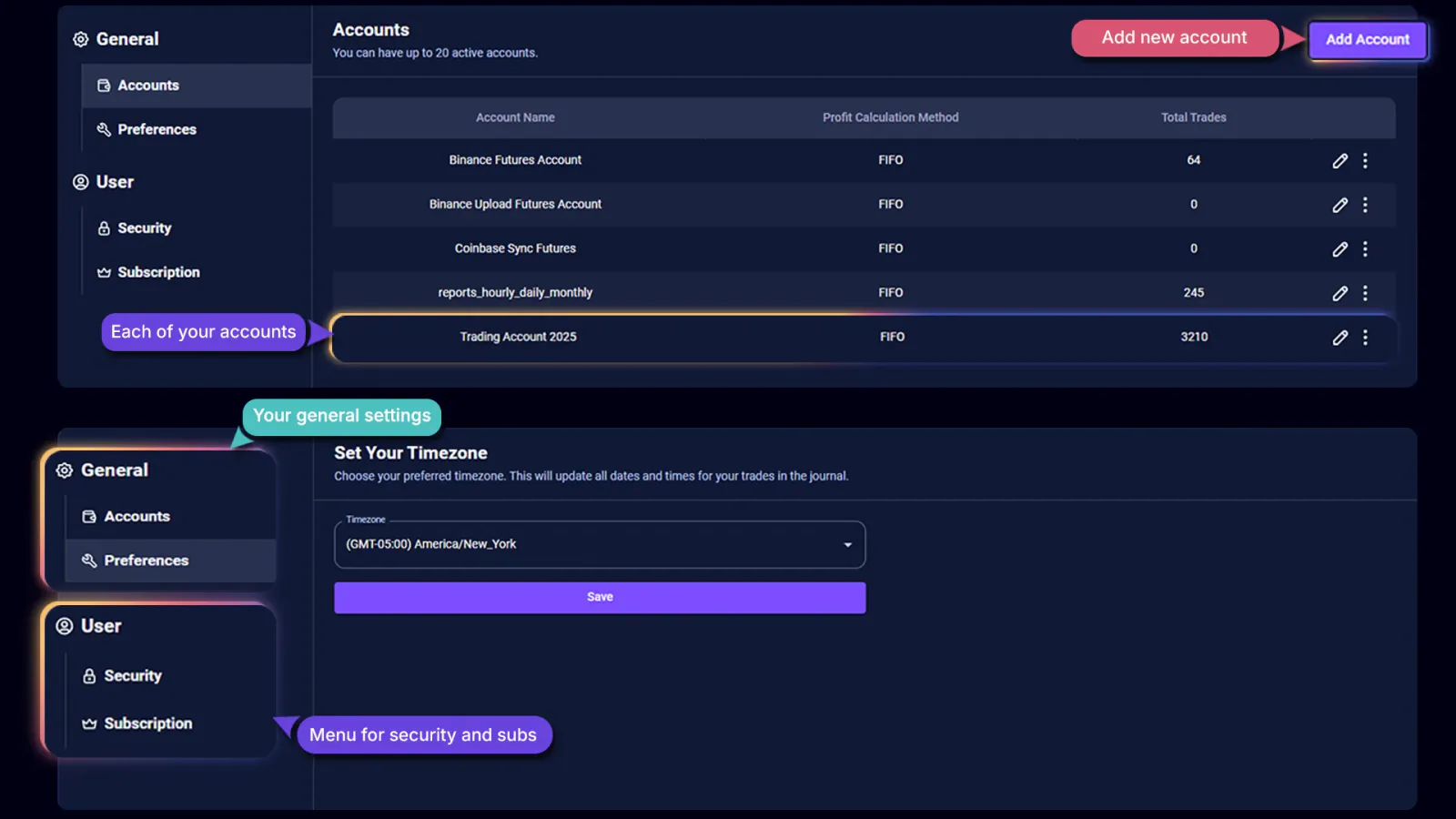
During the initial setup, you will choose the key preferences that define how your data is displayed. If you trade across multiple exchanges or accounts, TradeChainly allows you to keep everything organized from day one. Each account remains separated, so you can track performance per exchange or per trading account without mixing results.
It is also important to make sure your time zone is correct. Crypto trades run 24/7, and accurate timestamps matter when you review performance by hour or session. Setting the right time zone ensures that your trades line up with your actual trading day instead of being offset by several hours.
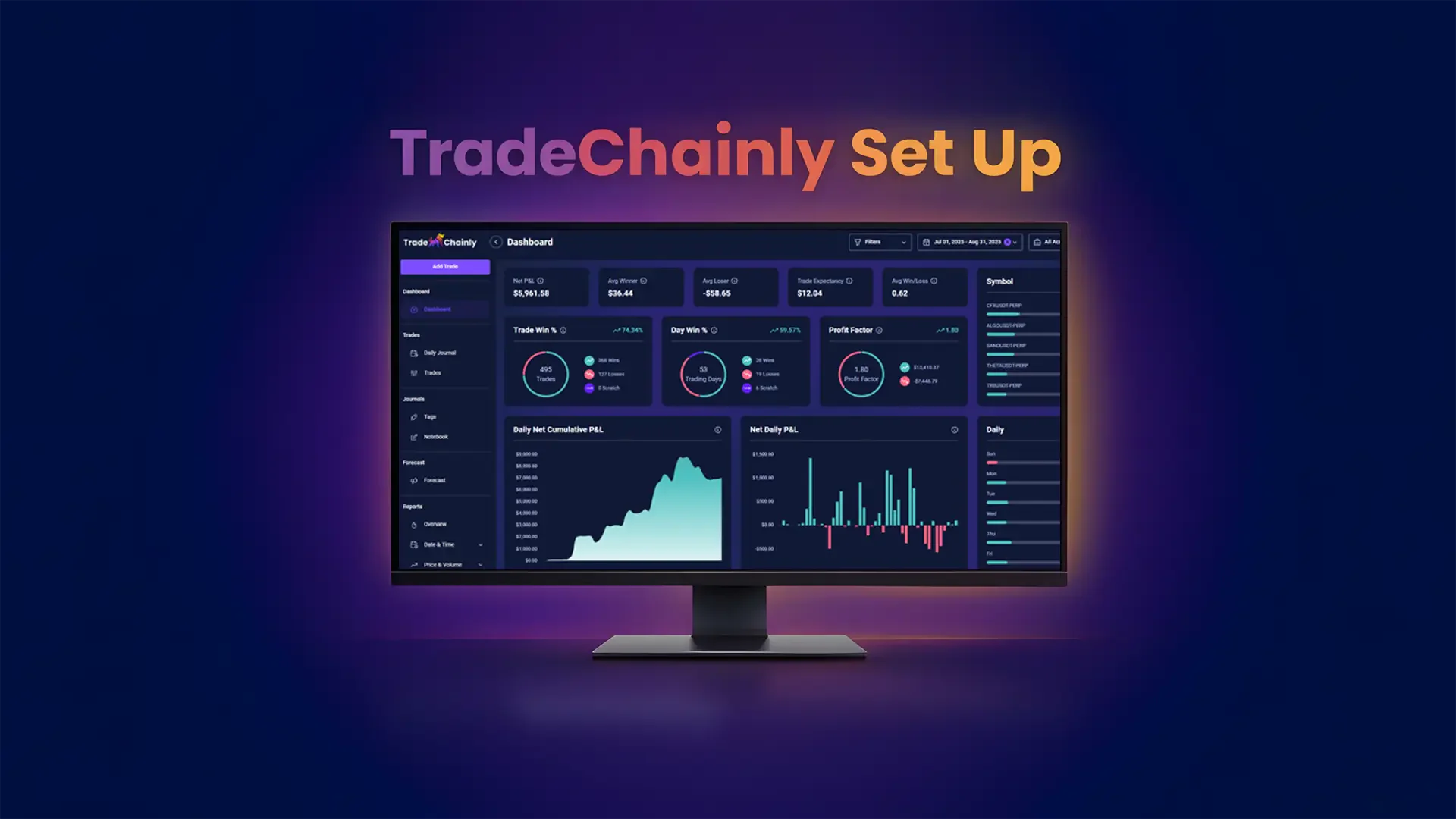
Once the core settings are in place, you will see your main dashboard. At this point, there may not be any data yet, which is completely normal. The dashboard will soon begin to populate with performance metrics, charts, and reports as soon as your trades start syncing. Think of this as your command center. Over time, this page becomes the clearest snapshot of your results as a day trader.
The next step is where the real power of TradeChainly begins. You will connect the exchanges you trade on so your trades are imported automatically, without you ever needing to manually log them.
Connecting Your Crypto Exchanges
This is the step that unlocks the real advantage of TradeChainly. Instead of manually entering trades or uploading CSV files every time you trade, you can connect your crypto exchanges directly. Once connected, TradeChainly automatically syncs your trades in the background. This is especially important for day traders and scalpers, since you may take dozens of trades in a single session. Automation keeps your journal accurate without adding extra work to your trading day.
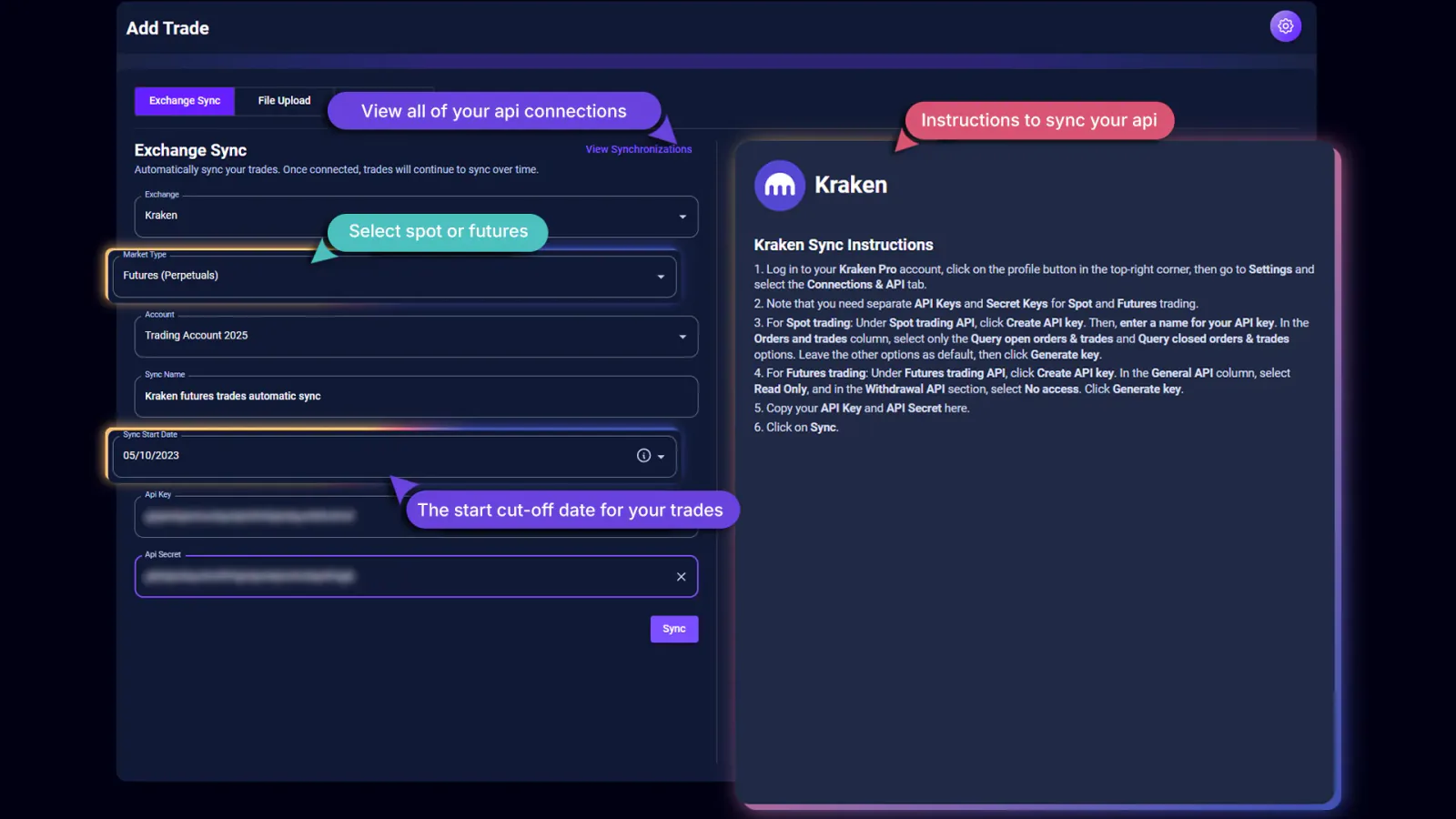
TradeChainly currently supports major crypto platforms like Binance, Bybit, OKX, KuCoin, Coinbase, Kraken, and Crypto.com. If you are trading perpetual futures with leverage, that is fully supported as well. When you connect an exchange, you will select the market type such as spot or futures so that your trades are imported correctly.
The connection process follows a simple one-time setup. You generate API keys inside your exchange account, then paste them into TradeChainly. These should always be read-only keys. That means they can only view your trade history. They cannot place trades, withdraw funds, or access your account in any way. This keeps the process secure while still allowing TradeChainly to sync your data.
You will also choose a sync start date. This tells TradeChainly from which point in time to begin importing your historical trades. Many traders choose the start of a month, or the date they began taking journaling seriously, so the data has a clean boundary.
Once everything is connected, TradeChainly begins automatic sync cycles roughly every three hours. You can also run a manual sync if you want your latest trades to appear immediately. From this point on, your trade history builds in the background while you focus on the market. No spreadsheets. No copy-paste. No stress about missing trades.
If you trade on multiple exchanges, you can connect them all. TradeChainly keeps each account separated while still allowing you to review combined performance when needed. This is ideal for traders who scalp on Bybit while swing trading on Binance or experimenting with altcoins elsewhere.
This step forms the foundation for everything else you will do inside the platform. Once your trades are flowing in automatically, the real analysis and refinement process can begin.
Reviewing Imported Trades and Organizing Accounts
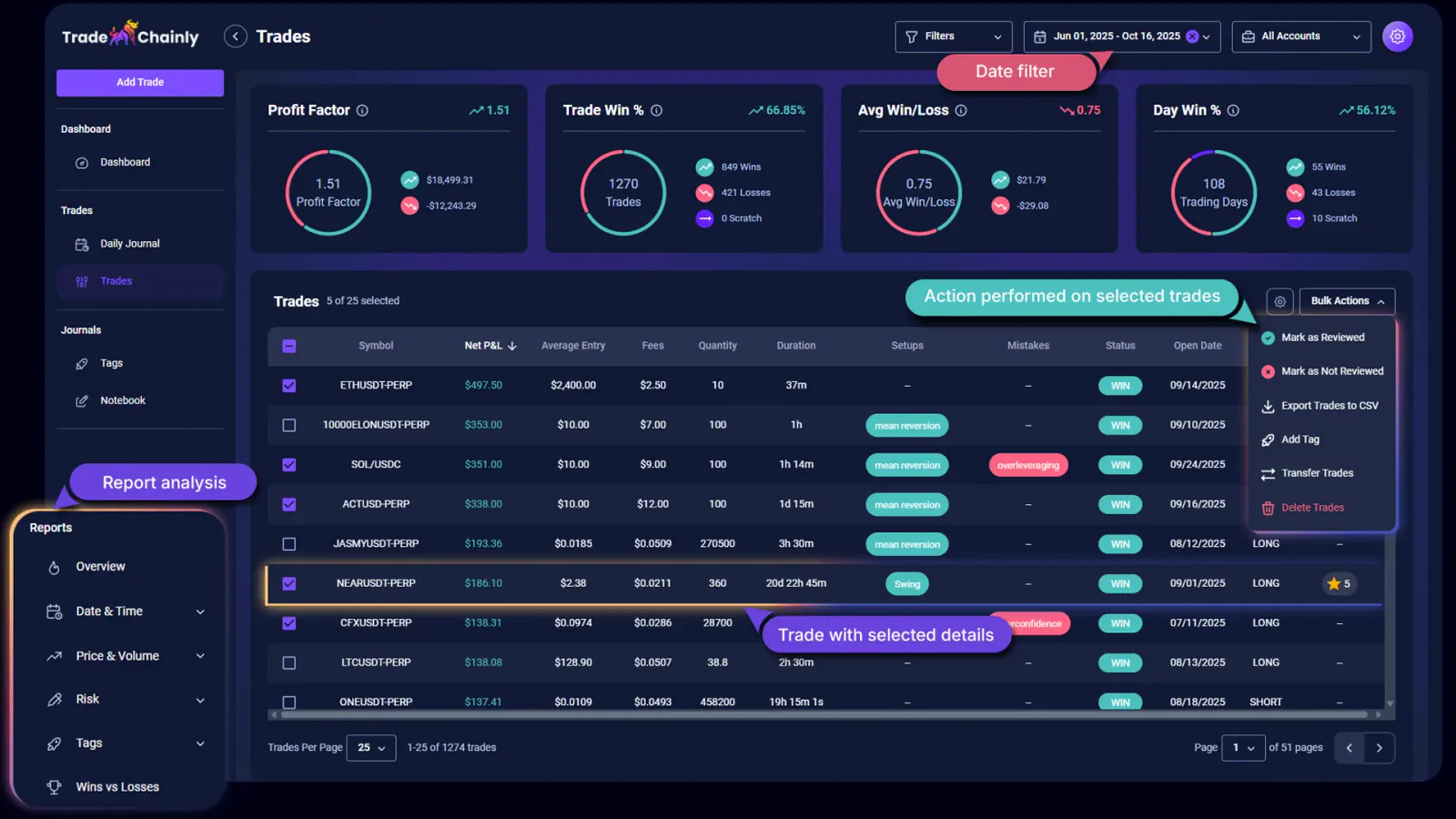
Once your exchanges are connected and TradeChainly begins syncing your trades, the next step is to review how everything is organized inside the platform. All imported trades appear in the Trades page, which is designed to handle high-volume day trading activity without becoming cluttered. You can scroll through your history, sort trades, filter by different criteria, and customize the columns so the table shows exactly the information you care about.
If you trade on multiple exchanges or across several accounts, TradeChainly keeps everything clearly separated. Each trade is always tied to the account it came from. This is important because many traders use different strategies in different places. For example, you might scalp BTC perpetuals on Bybit while swing trading spot altcoins on Binance. Keeping these streams of trades organized allows you to review performance by account instead of mixing all results together into one number.
Backend pagination ensures that the Trades page remains smooth even if you have thousands of executions in your history. You can adjust how many trades are shown at once, whether that is 25 or up to 100. The table itself is also flexible. If certain data points matter more to you, such as Net ROI or Entry Price, you can tailor the columns so they remain visible.
TradeChainly also supports bulk actions, which is especially helpful for active day traders. You can select groups of trades and mark them as reviewed, transfer them from one account to another if they were imported incorrectly, export them to CSV, assign tags, or delete trades that you do not want included in your journal. These tools make it easy to maintain a clean and accurate trading history without having to edit trades one by one.
Before moving deeper into performance analysis, it is worth spending a bit of time familiarizing yourself with this page. Once you feel comfortable navigating, filtering, and selecting trades, you will be ready to start tagging your setups and building the analytics that will guide your trading decisions.
Setting Up Tags for Setups, Emotions and Mistakes
Now that your trades are flowing into TradeChainly automatically, the next step is to turn that raw data into something meaningful. This is where tags come in. Tags allow you to label trades based on your setups, your execution quality, and even the emotions you experienced while trading. Over time, these tags become one of the most powerful parts of TradeChainly because they reveal patterns you would never see just by looking at profit and loss.
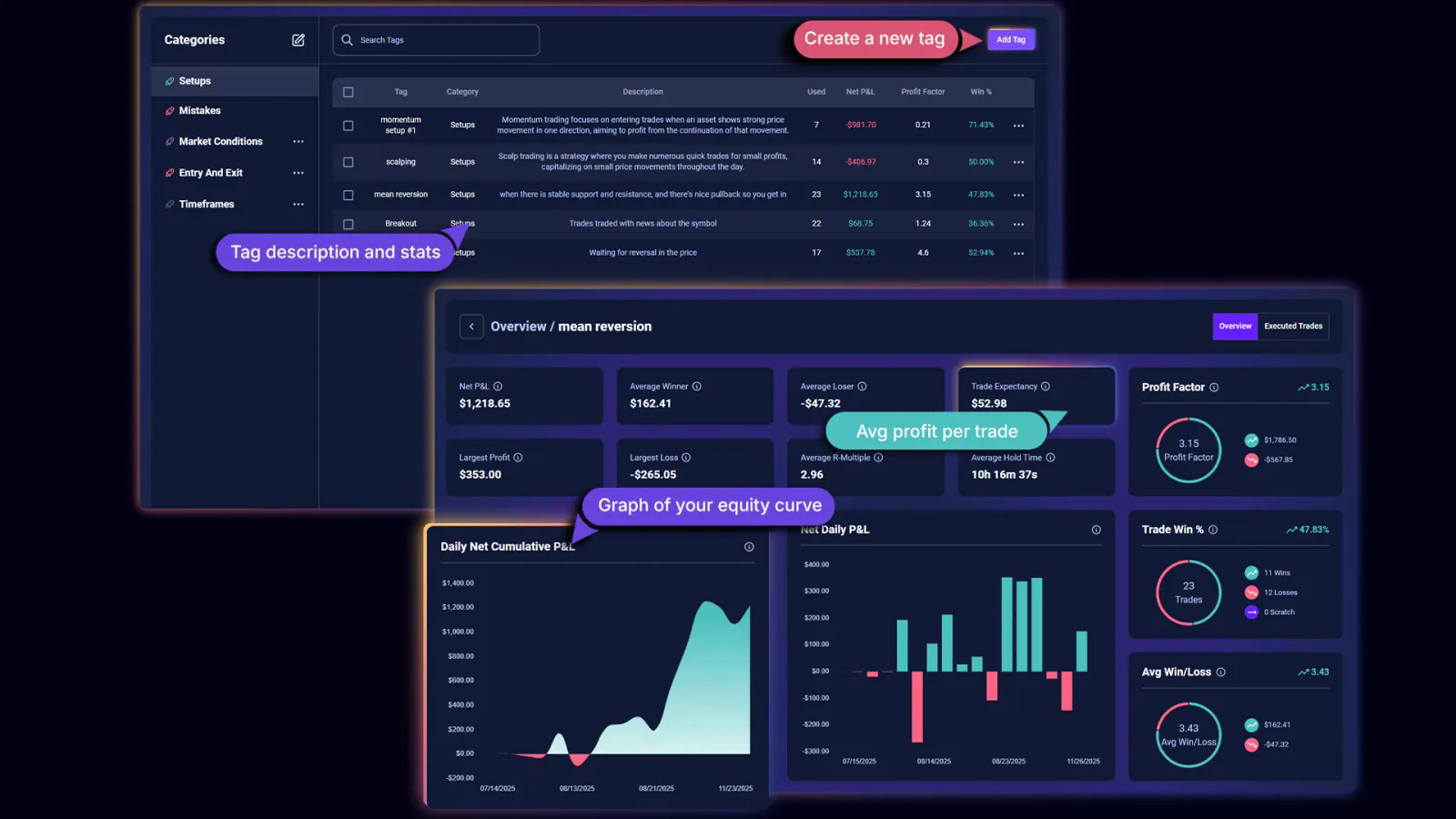
TradeChainly gives you complete flexibility to create your own categories and tags, but it also includes default categories like Setups and Mistakes so you can begin right away. Setups might include things like breakout trading, momentum scalping, or mean reversion. Mistakes might include revenge trading, FOMO entries, oversizing, hesitation, or moving your stop out of fear. You can also create additional categories, such as Emotions, Risk Management, or anything else that is meaningful to your strategy.
The key is to keep your tagging system simple and consistent. A good approach is to start with just a handful of setups and a few of the most common mistakes you make. For example, if you scalp BTC or ETH perpetuals with leverage, you might tag trades as “scalp breakout,” “support bounce,” or “trend continuation.” On the mistake side, you might tag “overleveraging,” “did not cut losses,” or “traded during chop.” Over time, you can refine the list, but starting lean prevents confusion.
Once tags are in place, you can assign them directly to trades in the Trade Details page or in bulk from the Trades page. This is where the journaling process becomes more structured. Instead of writing vague reflections like “bad day” or “market felt choppy,” you will see clear data such as which setups are profitable, which ones lose money, and which mistakes are costing you the most.
These tags flow into TradeChainly’s analytics and reports so you can analyze performance by setup, mistake category, or emotional state. This is incredibly valuable in crypto day trading, where leverage and volatility amplify your behavior. When you can see that most of your losses come from one or two repeated patterns, it becomes much easier to fix them.
If you are new to journaling, do not worry about being perfect from day one. The goal is progress, not perfection. Start with simple tags and build consistency. TradeChainly will do the heavy lifting by connecting those tags to your performance metrics.
Understanding the Dashboard Metrics
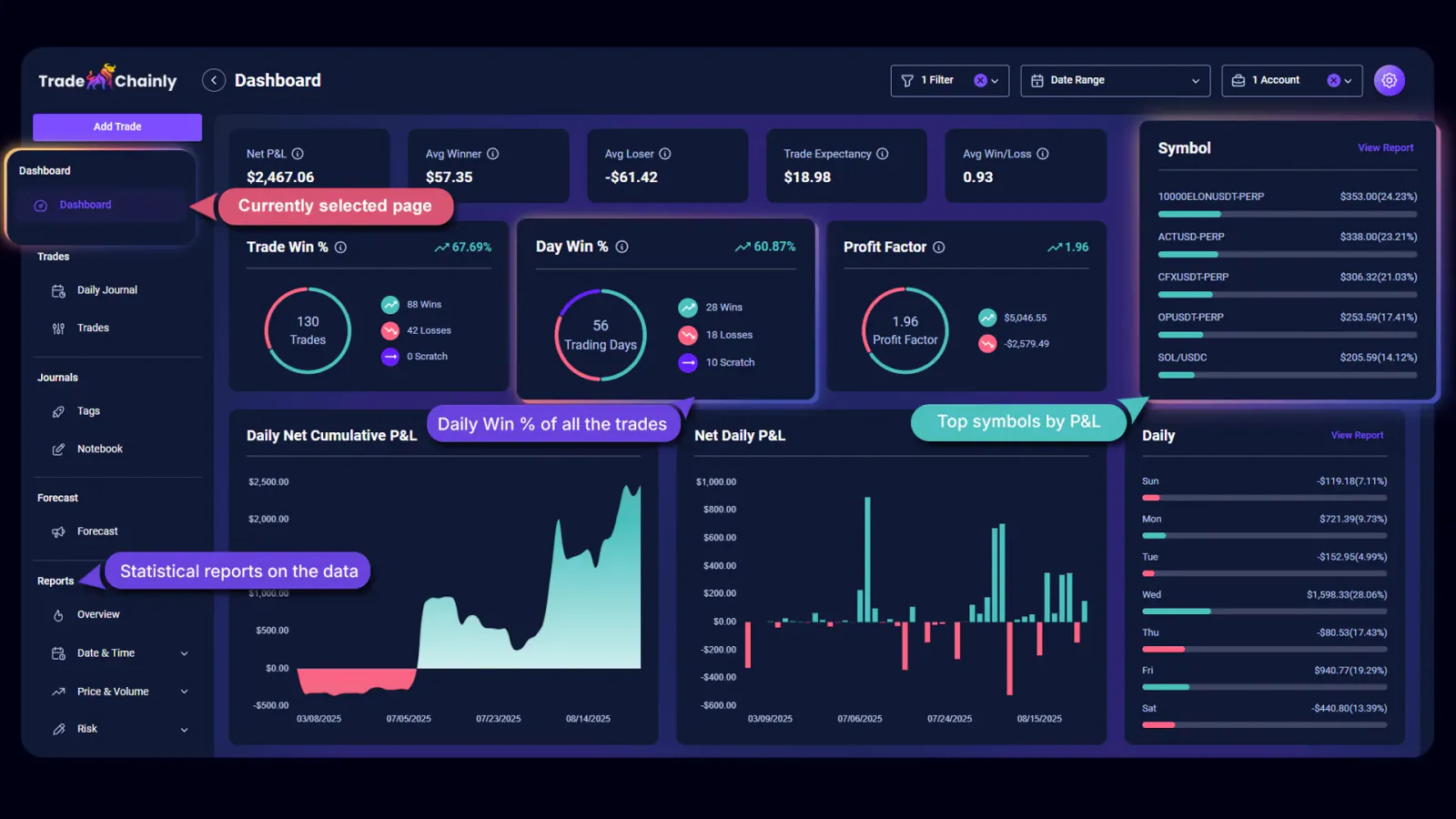
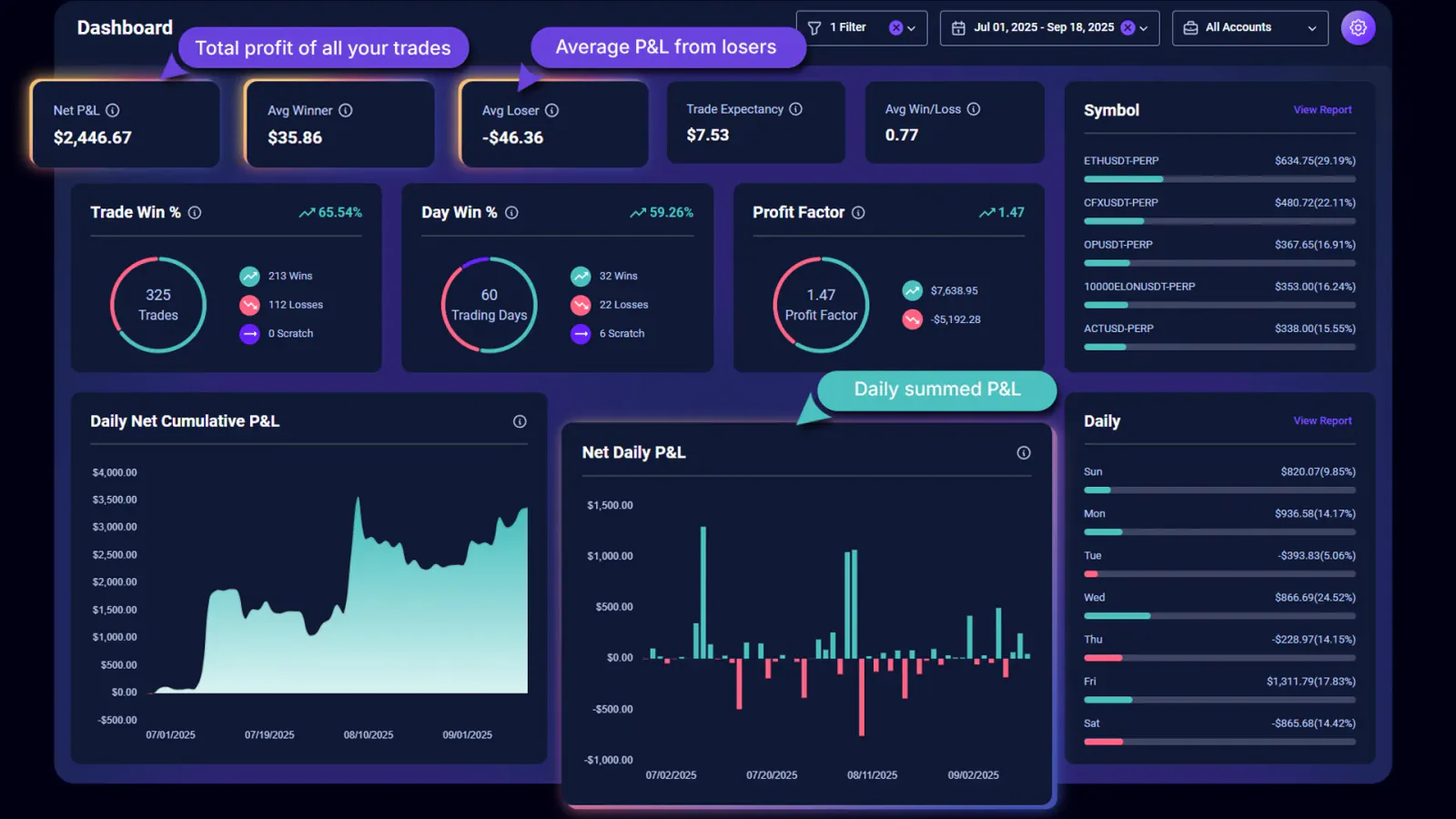
Once your trades and tags are in place, the Dashboard becomes the real heartbeat of TradeChainly. This page gives you a high-level view of your performance as a crypto day trader, so you can quickly understand whether your trading approach is working or drifting off track. Instead of guessing based on recent wins or losses, you get objective data that summarizes everything you have done across all connected exchanges.
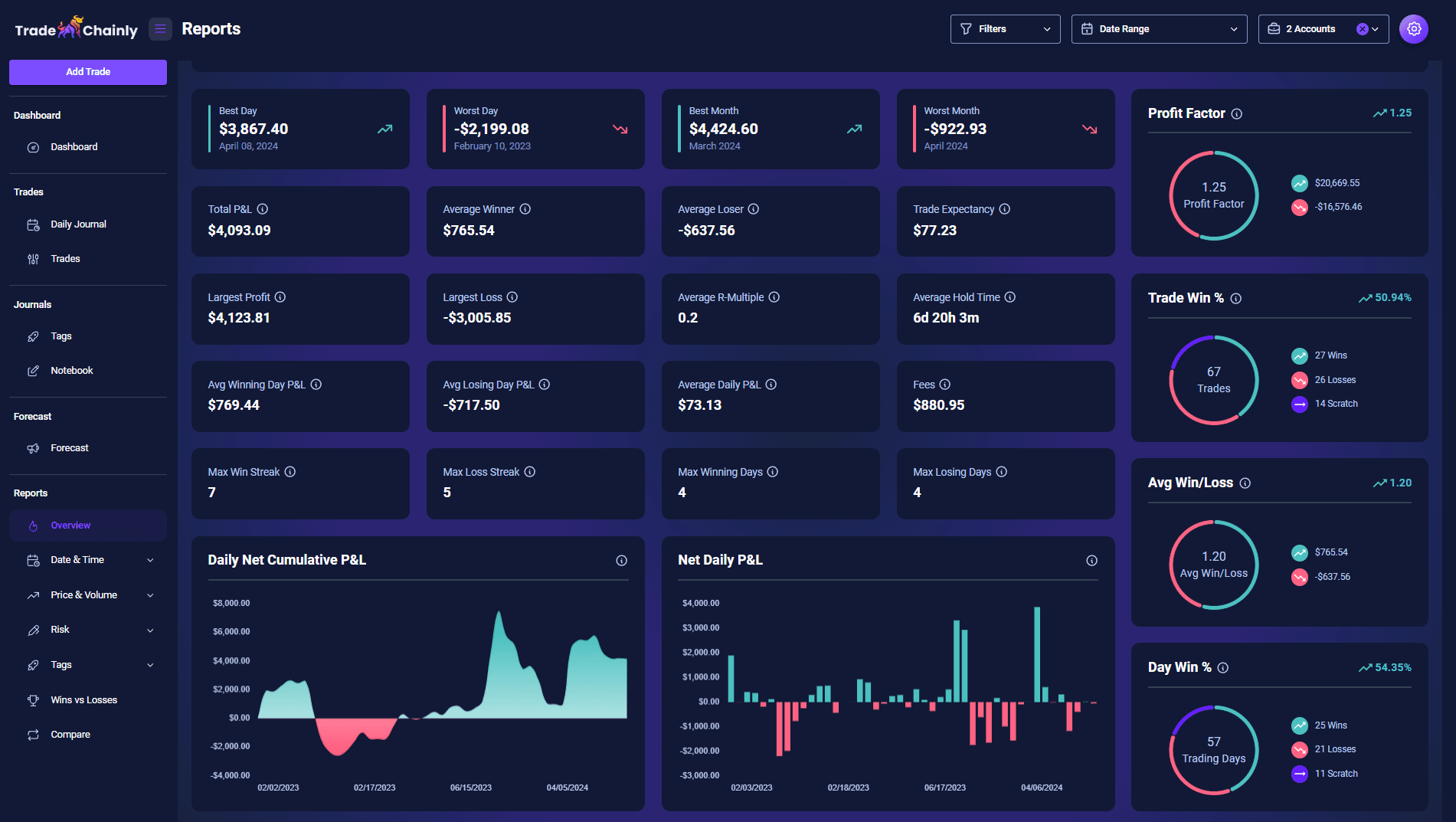
Some traders look at Net P&L first, because it shows the total profit or loss from your trades. That number matters, but it does not tell the full story. TradeChainly also shows you metrics like Profit Factor, Trade Win Percentage, Day Win Percentage, Average Winner, Average Loser, and Trade Expectancy. These reveal the quality of your trading, not just the final outcome.
For example, a trader with a lower win rate but a strong Average Win to Average Loss ratio may be trading a profitable trend-following or breakout strategy. Another trader with a high win rate but small winners and big losses may eventually struggle. The Dashboard makes these relationships easy to see, which helps you understand whether your edge is real or just luck over a short period of time.
You will also see visual charts such as Daily Net Cumulative P&L and Net Daily P&L. These charts show how your account equity changes over time and whether your results are stable, volatile, improving, or deteriorating. For day traders and scalpers, this visual clarity is important. Crypto moves quickly. Without data, it is easy to overreact to a single session and forget the bigger picture.
As more trades sync into TradeChainly, the Dashboard becomes more accurate and more useful. Your goal is not to stare at these metrics all day. Instead, you want to check in periodically to confirm that your trading remains aligned with your strategy. When something drifts, the data will show it before your emotions do.
Daily Journal and Trade Notes Setup
Numbers tell you what happened in your trading. Notes tell you why it happened. That is why TradeChainly includes both trade-level notes and daily journal entries. Together, they help you capture the thoughts, emotions, and decisions behind your trades so you can understand the full context, not just the statistics.
Trade notes are tied to individual trades. You might use them to document why you entered, where your stop was, what setup you were trading, and how well you followed your plan. If something went wrong, you can be honest about it. Maybe you chased a breakout too late, or you reduced your stop because you did not want to be wrong. These notes sit right beside the trade data, so when you review performance later you can see exactly what you were thinking at the time.
Daily notes work at a higher level. These belong in the Daily Journal page, where each trading day is summarized on a card that also shows your P&L, win rate, volume, and other stats. A daily note might cover bigger picture ideas such as market conditions, emotional state, discipline, fatigue, or confidence. Crypto trades 24/7, which means burnout and overtrading are real risks. Writing short reflections helps you recognize these patterns early instead of after serious damage is done.
TradeChainly makes this process simple and lightweight. You can switch between trades and days easily, add notes without breaking your workflow, and even attach screenshots when visual context matters. Many traders like to save charts of their best trades and worst mistakes so that important lessons become tangible instead of theoretical.
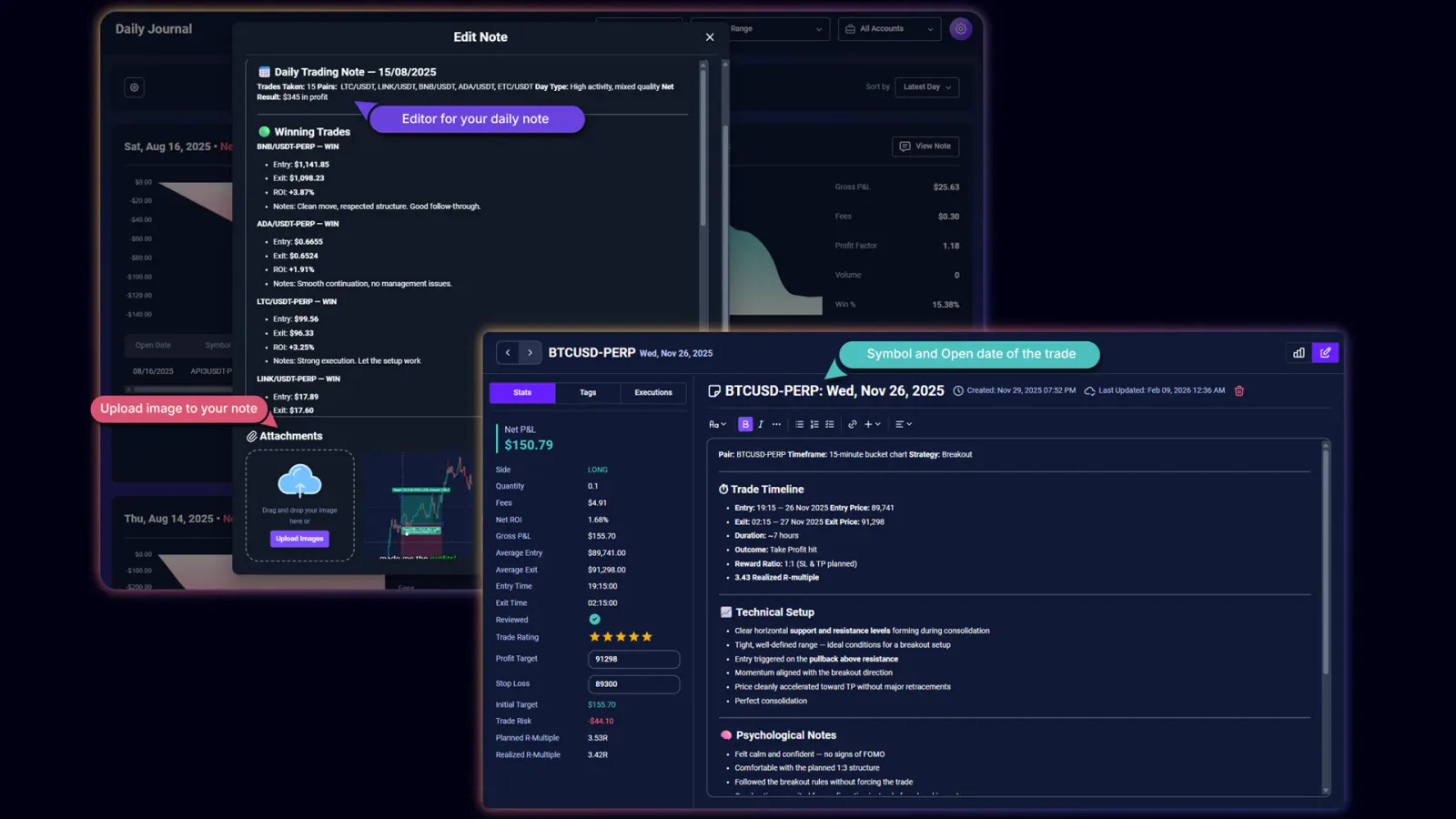
You do not need to write essays. A few clear sentences can be enough. The goal is to build awareness and create a record you can look back on. Over time, you will start noticing themes in your trading behavior, and those insights often become more valuable than any single winning trade.
Building a Simple Review Workflow
Now that TradeChainly is set up and your trades are syncing automatically, the real value comes from how you use the platform on a daily and weekly basis. A trading journal is not just a storage system for past trades. It is a review tool that helps you refine your edge over time. The key is to keep the process simple so that you can stick with it consistently, even during busy trading periods.
A good daily workflow might look something like this. After your trading session ends, open TradeChainly and look at the Trades page. Tag each trade based on setup quality, execution, and mistakes. If you journal daily, add a short note about your mindset, market environment, or anything else that stands out. You do not need to spend more than a few minutes here. The goal is to capture details while they are still fresh, not to write a novel.
Once per week, set aside a slightly longer review session. Open the Dashboard first to understand the bigger picture. Then explore relevant reports such as performance by symbol, hour of day, or setup. This is where many day traders spot repeating trends. Maybe you consistently lose money trading during low liquidity periods. Or maybe your best setups occur during specific volatility spikes. TradeChainly connects these dots for you so you can adapt more quickly.
Your goal is to make small adjustments rather than chasing perfection. Improving your average loser, reducing forced trades, or removing one bad habit can significantly change your results over time. TradeChainly simply provides the structure and clarity so that you can make those adjustments based on real data instead of emotion or guesswork.
When this review process becomes routine, your trading stops feeling random. You know what you are doing well. You understand your weak points. And most importantly, you are always moving forward rather than repeating the same mistakes.
Common Setup Mistakes to Avoid
Most traders do not struggle with journaling because the tool is bad. They struggle because the setup or workflow is incomplete. When TradeChainly is configured properly, it works smoothly in the background so you barely think about it. When it is not, you end up with gaps, missing trades, or cluttered data that is hard to trust.
One of the most common mistakes is selecting the wrong market type when connecting an exchange. If you trade perpetual futures but choose spot by accident, some trades may not sync the way you expect. Always double-check whether you are trading spot, margin, or futures before finalizing the connection. Getting this right once saves a lot of cleanup work later.
Another mistake is creating too many tags too early. Traders sometimes build long lists of setups and mistakes before they have even used the platform. The result is inconsistency. Keep your tagging simple at the start. A few core setups. A few key mistakes. You can always refine later once you see how your trading actually behaves in real conditions.
Some traders also forget to use notes consistently. Numbers alone do not show the emotional side of trading. If you skip notes, you lose valuable context about mindset, discipline, and decision-making. Even one or two sentences per day can make a huge difference when you look back weeks or months later.
A final common mistake is treating TradeChainly like a one-time setup project instead of an ongoing process. The goal is not perfection on day one. The goal is to create a system that becomes part of your routine. If you review trades regularly, apply tags consistently, and reflect honestly, the insights will take care of themselves.
Avoiding these simple mistakes keeps your data clean, your workflow smooth, and your journal genuinely useful instead of feeling like extra work.
Make Your Journal Part of Your Trading Routine
Setting up TradeChainly the right way is one of the best investments you can make in your trading process. Most crypto day traders focus almost entirely on execution. They think the next indicator, the next setup, or the next coin will change everything. In reality, progress usually comes from understanding your own data and behavior. A good trading journal gives you that clarity.
TradeChainly is designed so you do not have to fight your tools. Once your exchanges are connected, trades sync automatically. Tags help you identify what works and what hurts performance. Notes capture the emotional and psychological side of trading. The Dashboard and Reports turn everything into clear insights you can act on.
If you keep the setup simple and build a consistent review habit, TradeChainly becomes more than software. It becomes part of your trading edge. You know what is working. You see where risk creeps in. And you make adjustments based on reality rather than emotion.
If you have not already done so, start your TradeChainly setup and get your first trades syncing. The sooner you begin collecting data, the sooner you will understand your strengths and weaknesses as a crypto day trader. That awareness is what separates random results from intentional improvement.